
Progress
The Progress tab in the Survey Analytics workspace (/s/analyze/survey/{surveyId}/progress/progress) tracks the delivery, engagement, and completion funnel of a survey's invitation runs.
It is designed around a strict privacy boundary: organizers see who was invited and how far they progressed, but survey responses remain anonymous and are never linked to an invitation, token, or email address.
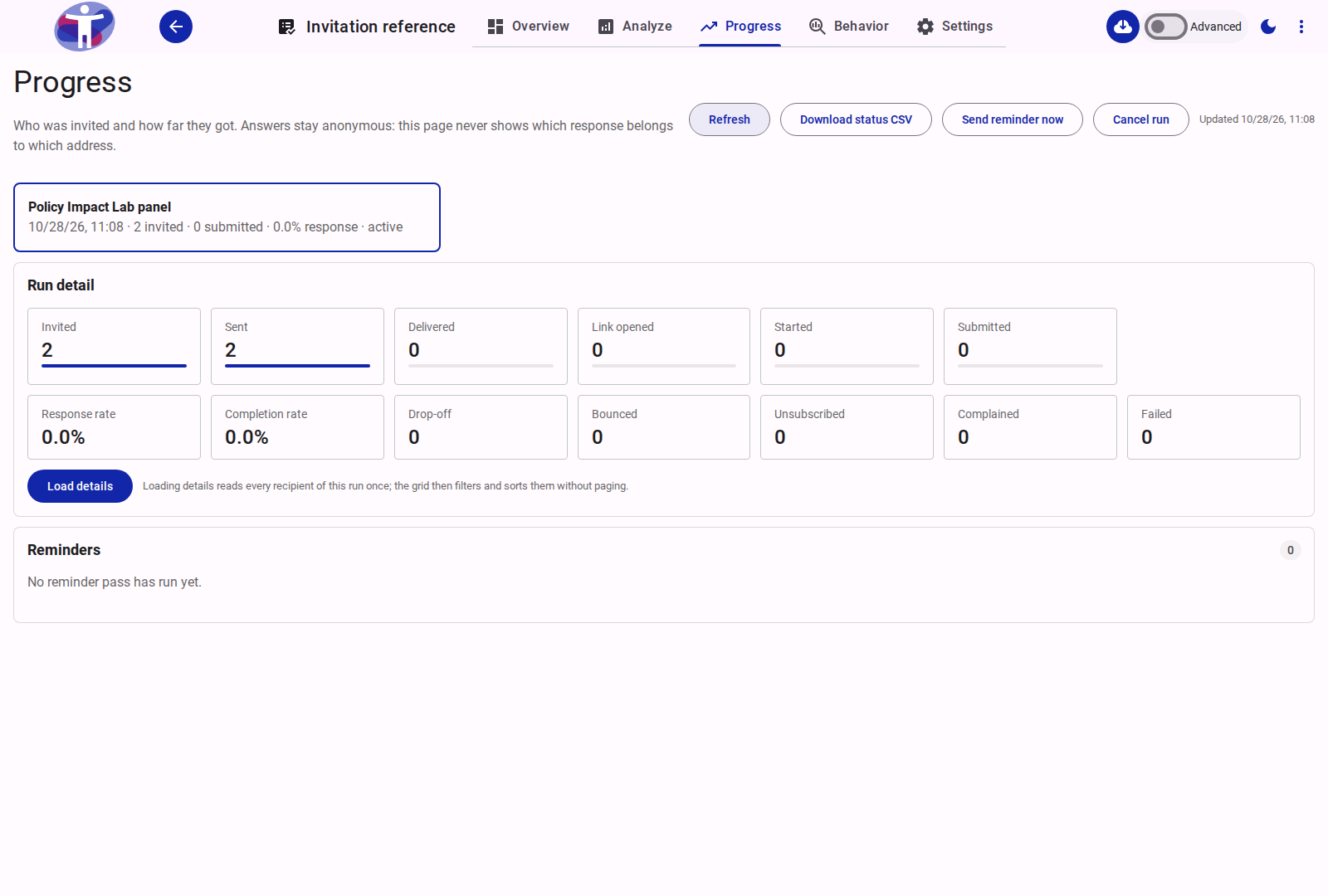
Run Selector Cards
Each invitation wave sent from Share → Distribute appears as an interactive card at the top of the page. Clicking a card loads its funnel counters and reminder log.
Each run card displays:
- Audience name: The name of the team audience the run targeted.
- Sent timestamp: When the run started sending.
- Summary metrics:
invitedCount,submittedCount, and the computedresponsepercentage. - Run status:
sending— batches are actively being dispatched.active— initial send completed; links are live and scheduled reminders are active.paused— automatically paused by the deliverability/reputation guard (high bounce or complaint rate after 1,000 sends) or a mail provider failure.cancelled— stopped by an editor; links that have not landed are deactivated and no further batches or reminders are sent.
Run Toolbar Actions
The header toolbar provides run-level controls for the currently selected run:
| Action | Availability | Description |
|---|---|---|
| Refresh | Always | Reloads the run's funnel counters and, if open, refreshes the per-recipient table. |
| Download status CSV | Team Owners, Admins, Editors | Exports a CSV (invitation-progress-{surveyId}.csv) of the run's recipients containing masked email addresses, statuses, timestamps, and reminder counts. Never includes full email addresses or survey answers. |
| Send reminder now | Active / Sending runs | Runs a dry-run check (remindInvitationRun with dryRun: true) to count eligible recipients, prompts for confirmation with the exact count, and dispatches a manual reminder pass. |
| Send remaining | When sentCount < invitedCount (and not paused/cancelled) | Sends the next batch of invitations when a large run was partially deferred by the 20,000/day team email cap. |
| Resume run | Paused runs only | Clears the pause state on a run so remaining invitations and reminders can resume. |
| Cancel run | Non-cancelled runs | Prompts for confirmation, marks the run cancelled, invalidates invitation links that have not landed, and stops any remaining batches or scheduled reminders. |
Run Detail: Funnel and Rate Tiles
The Run detail card renders two aligned rows of lapp-stat metric tiles read directly from the run document's aggregate counters.
Row 1: Monotonic Funnel Stages
Each stage tile includes a progress bar showing its ratio against Invited. Downstream stages are cumulative (an invitation that opened or submitted also counts toward earlier stages):
| Stage Tile | Counter Field | Definition |
|---|---|---|
| Invited | invitedCount | Total eligible recipients frozen into the run at creation time. |
| Sent | sentInvitationCount | Invitations accepted by the mail service (stage >= 1). |
| Delivered | deliveredCount | Invitations confirmed delivered by the mail provider webhook (stage >= 2). |
| Email opened | openedCount | Recipients whose mail client loaded the Mailgun open-tracking pixel. This is a read, not a survey visit (stage >= 3). |
| Survey started | landedCount | Recipients whose unique /v2/{surveyId}/i/{token} link was validated and who therefore landed on the survey. |
| Started answering | startedCount | Recipients whose survey app loaded and whose respondent actor was created (stage >= 4). |
| Submitted | submittedCount | Recipients who completed and submitted the survey (stage 5 / submittedAt present). |
An email open is not a survey landing: Mailgun's tracking pixel can fire without the recipient visiting the survey. landedCount is the direct evidence; an invitation that started or submitted also counts as landed, which keeps runs recorded before the split readable.
Row 2: Rates and Negative Outcomes
| Tile | Formula / Field | Definition |
|---|---|---|
| Response rate | Submitted ÷ Invited | Percentage of invited recipients who submitted the survey (formatted to 1 decimal place). |
| Completion rate | Submitted ÷ Started answering | Percentage of recipients who submitted after starting to answer the survey. |
| Drop-off | max(Started answering − Submitted, 0) | Number of recipients who started answering the survey but have not submitted yet. |
| Bounced | bouncedCount | Invitations that hard-bounced (or reached three consecutive soft bounces). Added to the customer-wide suppression list. |
| Unsubscribed | unsubscribedCount | Recipients who used the one-click unsubscribe link. Added to the customer-wide suppression list. |
| Complained | complainedCount | Recipients who reported the email as spam. Added to the customer-wide suppression list. |
| Failed | failedCount | Sends rejected by the mail service before delivery (cleared if a later retry succeeds). |
Recipient Details Grid
Per-recipient rows are loaded on demand when a team owner, admin, or editor clicks Load details. Survey guests and non-team collaborators see the aggregate funnel tiles only.
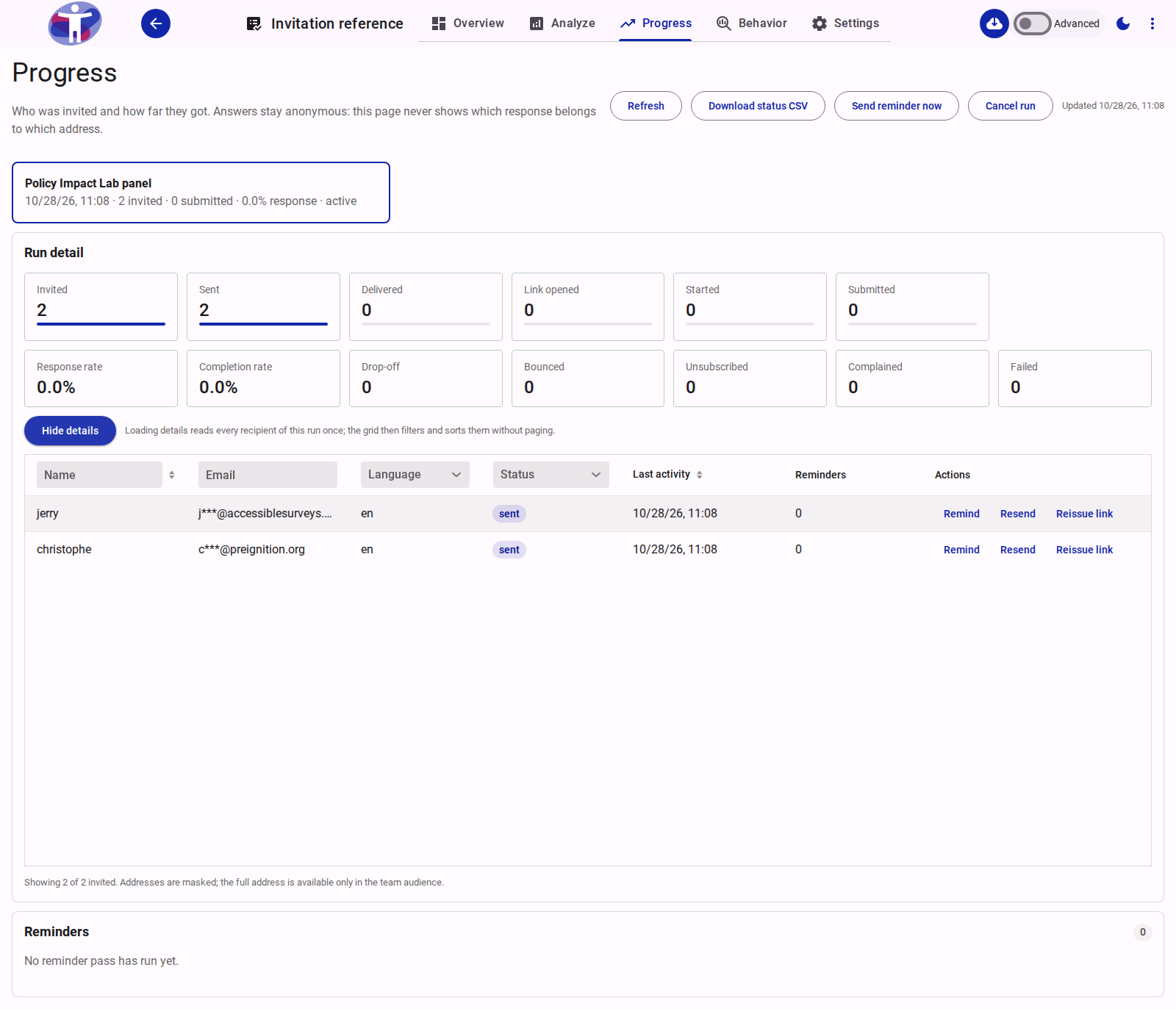
Loading details performs a single read of the run's invitation documents so the browser grid can filter and sort across the entire run without server paging.
Columns and Filters
| Column | Header Control | Description |
|---|---|---|
| Name | Text filter + Sorter | Recipient's name (or — when unset). |
| Text filter | Masked email address keeping only the first character of the local part and the domain (for example, j***@accessiblesurveys.com). Full addresses are only visible in Team Settings → Audiences. | |
| Language | Select filter | Language code used for the recipient's invitation. |
| Status | Select filter | Exclusive lifecycle status badge: invited, sent, opened, started, submitted (green), unsubscribed (amber), bounced (red), complained (red), or failed (red). Note that provider delivery (delivered) displays as sent in the status column. |
| Last activity | Column sorter | Timestamp of the most recent lifecycle event for that invitation. |
| Reminders | Static header | Total reminders sent to this recipient, plus a (N failed) note if any reminder attempts failed. |
| Actions | Row action buttons | Per-recipient recovery and reminder actions (see below). |
Per-Recipient Row Actions
| Action | Enabled When | Behavior |
|---|---|---|
| Remind | Status is not submitted, unsubscribed, bounced, complained, or failed | Sends a manual reminder to this recipient (remindInvitation). Enforces a 24-hour cooldown since the last reminder, a maximum of 2 manual reminders, and a maximum of 5 total reminders per recipient. |
| Resend | Status is not submitted, unsubscribed, bounced, or complained | Re-sends the invitation email with the recipient's existing link (resendInvitation). Used to recover from a failed send or a lost email. |
| Reissue link | Status is not submitted, unsubscribed, bounced, or complained | Prompts for confirmation, immediately invalidates the old invitation token, generates a new /v2/{surveyId}/i/{token} link, and emails it to the recipient (reissueInvitation). |
Reminders History Card
The Reminders card at the bottom of the page lists every scheduled and manual reminder pass recorded on the run (reminderHistory):
- Pass:
Reminder 1,Reminder 2,Reminder 3(for scheduled passes) orManual(for editor-triggered passes). - When: Local timestamp of the pass.
- Who:
Scheduled jobor the editor who triggered a manual pass. - Sent: Number of reminder emails accepted by the mail service during the pass.
- Failed: Number of reminder emails that failed during the pass.
If scheduled reminders fail three times in a row (reminderErrorAt), the card displays a warning banner advising the editor to inspect the recipient list and mail settings before retrying.